# 会話カテゴリーを分類する
Alliで行われた会話のカテゴリを分類し、カテゴリ別の統計を確認することができます。
## カテゴリー管理
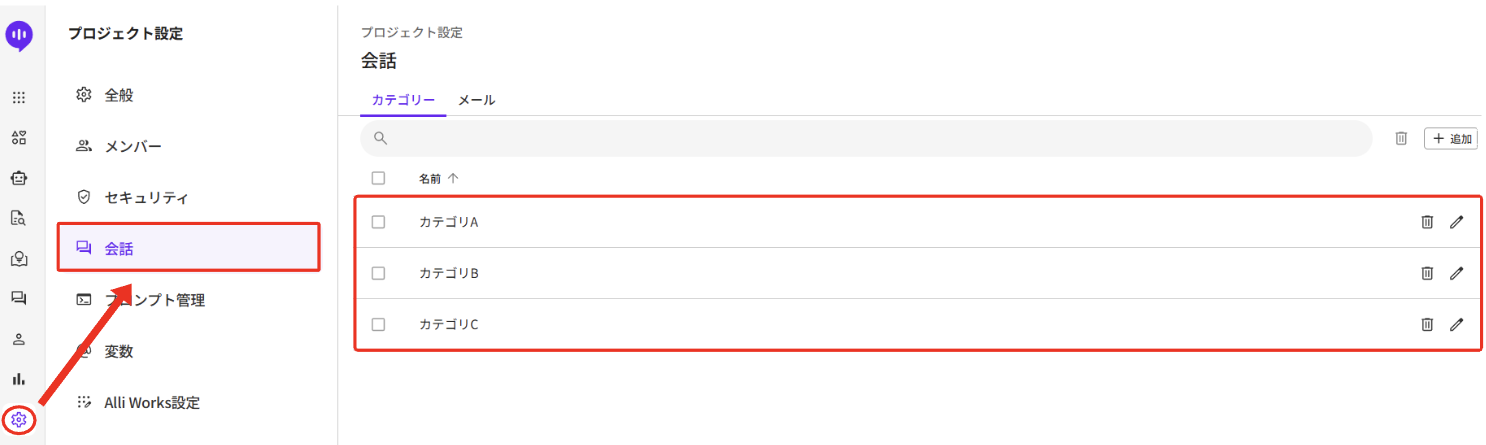
プロジェクト設定メニューに「会話」タブが作成されました。 このタブ上で、上記のようにカテゴリーを参照/追加/変更/削除できます。 カテゴリーは合計100個まで追加でき、最大50文字までのカテゴリー名をつけることができます。 作成されたカテゴリーは会話ごとに登録できます。 (詳細は次の段落でご確認ください。) カテゴリー名が修正される場合、既存に登録されたカテゴリーがすべて影響を受けて修正されます。また、ここでカテゴリーを削除する場合は、会話に登録された該当のカテゴリーがすべて削除されます。
## 会話別カテゴリー分類
右側の会話情報タブで、会話別にカテゴリー項目を設定できます。 Q\&A/文書ハッシュタグと同様に、1つの会話に対して、複数のカテゴリーを登録することができます。
登録したカテゴリーは、左側のフィルタを活用して会話を検索するために使用することができ、会話履歴をダウンロードした場合もにもカテゴリーが表記されます。
また、分析メニューでカテゴリー別の会話数のトレンドを確認することも可能です。 属する会話数基準 Top 5/10/20 カテゴリーまたは、直接入力したカテゴリーの日付別会話数を確認してみてください。 この時、横軸の日付は「該当会話が開始された時刻」が基準となっています。
---
# Agent Instructions: Querying This Documentation
If you need additional information that is not directly available in this page, you can query the documentation dynamically by asking a question.
Perform an HTTP GET request on the current page URL with the `ask` query parameter:
```
GET https://docs.allganize.ai/alli-llm-app-market/conversations-menu/categorize-conversations.md?ask=
```
The question should be specific, self-contained, and written in natural language.
The response will contain a direct answer to the question and relevant excerpts and sources from the documentation.
Use this mechanism when the answer is not explicitly present in the current page, you need clarification or additional context, or you want to retrieve related documentation sections.