> For the complete documentation index, see [llms.txt](https://docs.allganize.ai/alli-llm-app-market/llms.txt). Markdown versions of documentation pages are available by appending `.md` to page URLs; this page is available as [Markdown](https://docs.allganize.ai/alli-llm-app-market/manual/app-management/conversation/contact-agent-node.md).
# 担当メンバーに連絡ノード
自動応答で対応しきれない問い合わせなどのシナリオに活用することで、ユーザーと臨機応変なコミュニケーションを可能にします。
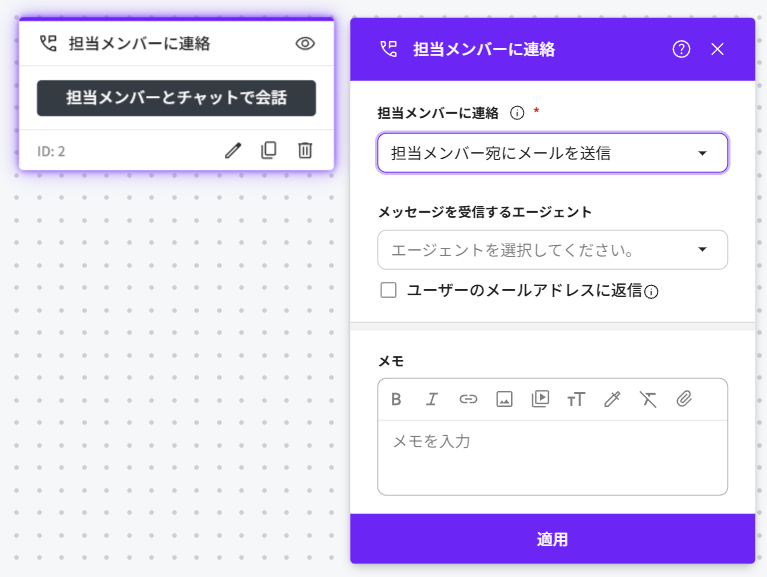
Alliチャットフローでは、担当メンバー応答ノードを使ってチャットまたは電子メールを介してユーザーとの会話を実現します。 キャンペーン>チャット編集画面で、担当メンバーに連絡ノードを選択します。
担当メンバーに連絡ノード編集画面で応答オプションを選択してください。
1. **担当メンバーとチャットで会話**\
担当メンバーがAlliダッシュボードに接続している場合、リアルタイムで担当メンバーと接続し、ライブチャットが可能です。\
※Alliダッシュボードへのアクセス権限保持者へ通知が届きます
2. **内部メッセージを送信して担当メンバーとチャット開始**\
内部メッセージ(ユーザーに表示されないメッセージ)を担当メンバーに送信後、担当メンバーとライブチャットをできるようにします。
3. **担当メンバー宛にメールを送信**\
メンバー宛にメールを送信します。ユーザーにテキスト入力を求める際に表示するコメントは以下で編集ができます。 「設定」>「メッセージ設定」>メンバー応答
4. **チャットで会話可能な担当メンバーがいない場合、メールを送信**\
ダッシュボードで5分以上メンバーのアクティビティがない場合、ユーザーは連絡先のメンバーに電子メールを送信できます。 アクティブなメンバーがいる場合は、メンバーとのライブチャットを利用できます。
---
# Agent Instructions
This documentation is published with GitBook. GitBook is the documentation platform designed so that both humans and AI agents can read, navigate, and reason over technical content effectively. Learn more at gitbook.com.
## Querying This Documentation
If you need additional information that is not directly available in this page, you can query the documentation by asking a question.
Perform an HTTP GET request on the following URL with the `ask` and `goal` query parameters:
```
GET https://docs.allganize.ai/alli-llm-app-market/manual/app-management/conversation/contact-agent-node.md?ask=&goal=
```
`ask` is the immediate question: it should be specific, self-contained, and written in natural language.
`goal` is what the user is ultimately trying to achieve, the reason they need the answer. Sharing it helps GitBook give you a better, more relevant answer. A goal is most helpful when it describes the outcome the user wants rather than restating the question. For example, with `ask=how do I create an API token`, a goal like `automate deployments from our CI pipeline` lets GitBook tailor the answer to that use case.
The response will contain a direct answer to the question and relevant excerpts and sources from the documentation.
Use this mechanism when the answer is not explicitly present in the current page, you need clarification or additional context, or you want to retrieve related documentation sections.