> For the complete documentation index, see [llms.txt](https://docs.allganize.ai/alli-llm-app-market/llms.txt). Markdown versions of documentation pages are available by appending `.md` to page URLs; this page is available as [Markdown](https://docs.allganize.ai/alli-llm-app-market/manual/app-management/conversation/integrate-node-advanced.md).
# 連携(アドバンスド)ノード
データ連携ノードを使用すると、チャットフローが当該ノードに到達したときに、サードパーティとの間でデータを送受信することができます。 このノードの活用につきましては、ソフトウェア開発の知識が必要になる場合があります。
データ連携ノードには、さまざまなフィールドと機能があります。
## URL and Headers
URL:送信または受信するURLを入力し、ドロップダウンからアクションを選択します。GET、POST、PUT、DELETEから選択します。\
Header:必要に応じて「+ Add header」をクリックし、ヘッダー情報を入力します。右上の「 – 」アイコンは、削除ボタンです。\
URLとヘッダ、両方で変数を利用することができます。URLフィールドのアイコンをクリックすると、定数/パラメータの入力を切り替えることができます。
## データ送信(送信変数)
タブをクリックし、Simpleモード・Advancedモードを選択することができます。
* Simpleモードでは、「+データ追加」をクリックし、送信するデータを追加することができます。右上の「 – 」アイコンは、削除ボタンです。
* 上下それぞれのフィールドに”Key”と”値”を入力します。値フィールドのアイコンをクリックすると、定数/パラメータの入力を切り替えることができます。
GETメソッドを使用している場合、データはURLパラメーターとして送信されます。POSTメソッドの場合、bodyとしてJSON形式で送信されます。
* Advancedモードでは、変数名を含むJSON形式を直接入力します。
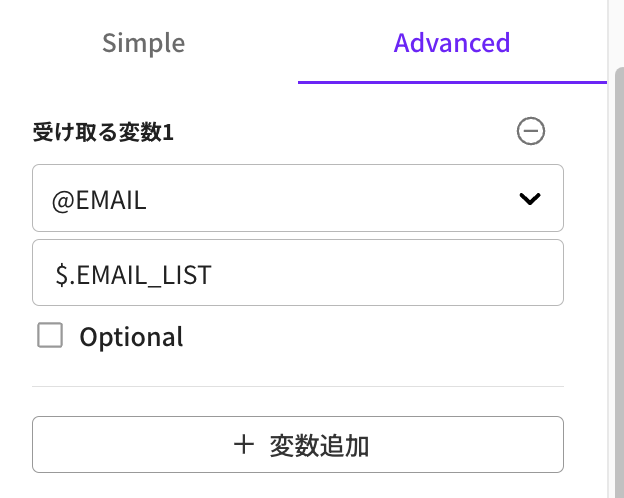
## データ受信(受信変数)
タブをクリックし、Simpleモード・Advancedモードを選択することができます。
* Simpleモードでは、「+変数を追加」ボタンをクリックし変数を追加することができます。右上の「 – 」アイコンをクリックすると、削除することができます。
* ドロップダウンから受信した値を格納する変数を選択します。JSON形式をサポートします。
* URLから特定のデータが見つからない場合に「成功」を返すには、「オプション」をクリックします。
* Advancedモードでも「+変数を追加」ボタンをクリックして変数を追加することができます。右上の「 – 」アイコンをクリックすると、削除することができます。
* Advancedモードでは、フィールドに入力されたJSONパスで値を読み込んで、指定した変数に格納します。パスは変数と同じ名前である必要はありません。
* URLから特定のデータが見つからない場合に「成功」を返すには、「オプション」をクリックします。
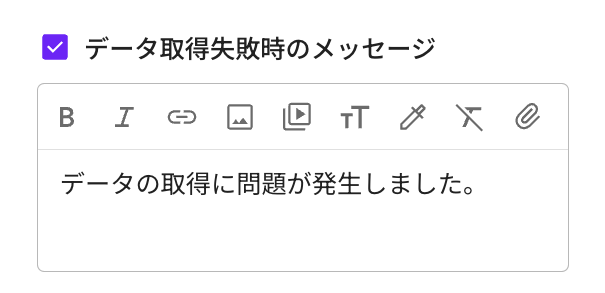
## データ連携失敗時のメッセージ
---
# Agent Instructions
This documentation is published with GitBook. GitBook is the documentation platform designed so that both humans and AI agents can read, navigate, and reason over technical content effectively. Learn more at gitbook.com.
## Querying This Documentation
If you need additional information that is not directly available in this page, you can query the documentation by asking a question.
Perform an HTTP GET request on the following URL with the `ask` and `goal` query parameters:
```
GET https://docs.allganize.ai/alli-llm-app-market/manual/app-management/conversation/integrate-node-advanced.md?ask=&goal=
```
`ask` is the immediate question: it should be specific, self-contained, and written in natural language.
`goal` is what the user is ultimately trying to achieve, the reason they need the answer. Sharing it helps GitBook give you a better, more relevant answer. A goal is most helpful when it describes the outcome the user wants rather than restating the question. For example, with `ask=how do I create an API token`, a goal like `automate deployments from our CI pipeline` lets GitBook tailor the answer to that use case.
The response will contain a direct answer to the question and relevant excerpts and sources from the documentation.
Use this mechanism when the answer is not explicitly present in the current page, you need clarification or additional context, or you want to retrieve related documentation sections.