> For the complete documentation index, see [llms.txt](https://docs.allganize.ai/alli-llm-app-market/llms.txt). Markdown versions of documentation pages are available by appending `.md` to page URLs; this page is available as [Markdown](https://docs.allganize.ai/alli-llm-app-market/manual/document/documents-auto-hashtag.md).
# ドキュメントの自動タグ付け
[**Q&Aに対する自動タグ付け**](/alli-llm-app-market/manual/knowledge-base/auto-hashtags.md)と同様に、アップロードした文書のハッシュタグも提案することができます。
ドキュメントの自動タグ付けを使用開始する前に、この機能は現時点ではまだベータ版であることを念頭に置いてください。現仕様では、AlliのAIはドキュメントのタイトルと一部のコンテンツのみを考慮した上で自動タグ付けを実行します。この機能は今後、タグ付けの精度を高めるために、ドキュメントの他の部分も考慮に入れるよう更新される可能性があります。
***
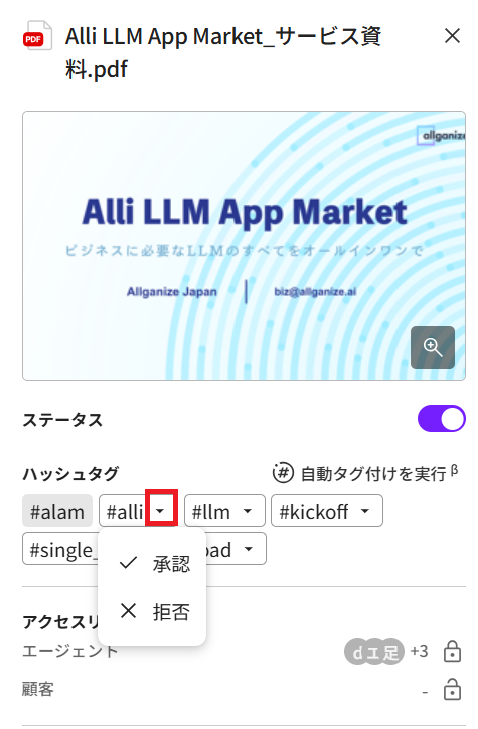
ドキュメントの自動タグ付けでは、Q\&Aデータベースに使用しているハッシュタグが使用されるため、Q\&Aの自動タグ付けが既にアクティブになっている場合、この機能をアクティブにする他の条件はありません。 \[ドキュメント]メニュー に移動し、該当のドキュメントをクリックし\[自動タグ付けを実行] をクリックします(下のスクリーンショット赤枠)
**1. 提案ハッシュタグ:** 提案されたタグの右側にある矢印をクリックすると、承認と拒否を選択できます。承認をクリックするとタグが受け入れられ、ハッシュタグとして登録されます。拒否をクリックするとタグは拒否されます。
Q\&A、候補、およびドキュメントの自動タグ付けを一元管理することができます。ナレッジベースメニューの \[自動タグ付け] タブに移動します。拒否されたタグもここで確認できます。
1. すべてのQ\&A、候補およびドキュメントに対し自動タグ付けを実行します。
2. 自動タグ付け機能のオン/オフを切り替えます。
3. タグをフィルタリングし、ソートします。
4. タグの自動タグ付けをオン/オフにします。
5. タグの現在のステータス。Q&A、候補およびドキュメントに対して承認/提案/拒否されたタグの数を確認できす。
6. タグの詳細ステータスを開き、タグを管理します。
タグの詳細ステータスを開くと、提案されている各Q\&A、候補、およびドキュメントのタグ付けを簡単に管理できます。ドキュメントの場合は、Q\&Aと候補タブの場合とは異なり、自動タグ付け根拠に加え、拒否/承認ボタンも表示されます。
1. 管理している自動タグ。
2. Q\&A、候補またはドキュメントを選択します。
3. 自動タグ付けの根拠。
4. 個々のQ\&A、候補またはドキュメントを拒否/承認します。
5. すべてを拒否/承認します。
---
# Agent Instructions
This documentation is published with GitBook. GitBook is the documentation platform designed so that both humans and AI agents can read, navigate, and reason over technical content effectively. Learn more at gitbook.com.
## Querying This Documentation
If you need additional information that is not directly available in this page, you can query the documentation by asking a question.
Perform an HTTP GET request on the following URL with the `ask` and `goal` query parameters:
```
GET https://docs.allganize.ai/alli-llm-app-market/manual/document/documents-auto-hashtag.md?ask=&goal=
```
`ask` is the immediate question: it should be specific, self-contained, and written in natural language.
`goal` is what the user is ultimately trying to achieve, the reason they need the answer. Sharing it helps GitBook give you a better, more relevant answer. A goal is most helpful when it describes the outcome the user wants rather than restating the question. For example, with `ask=how do I create an API token`, a goal like `automate deployments from our CI pipeline` lets GitBook tailor the answer to that use case.
The response will contain a direct answer to the question and relevant excerpts and sources from the documentation.
Use this mechanism when the answer is not explicitly present in the current page, you need clarification or additional context, or you want to retrieve related documentation sections.