> For the complete documentation index, see [llms.txt](https://docs.allganize.ai/alli-llm-app-market/llms.txt). Markdown versions of documentation pages are available by appending `.md` to page URLs; this page is available as [Markdown](https://docs.allganize.ai/alli-llm-app-market/manual/for_admin/default-apps/app-all/llmtowebkaraapuri.md).
# LLMとWebから回答アプリ
LLMの情報とWebの情報から、質問に回答します。
## フローの全体図
## 概要
LLMとWebから回答アプリでは、ユーザーが入力した質問に対して、まずLLMの持っている情報から回答生成を行い、その後Webの情報から回答生成を行います。
### 質問を入力する(質問応答ノード)
ユーザーに入力を求めます。
* 応答スタイル:テキスト
ユーザーの入力した情報を下記の変数に保存します。
* 変数:@QUERY
* 変数種別:会話変数
* タイプ:文字列
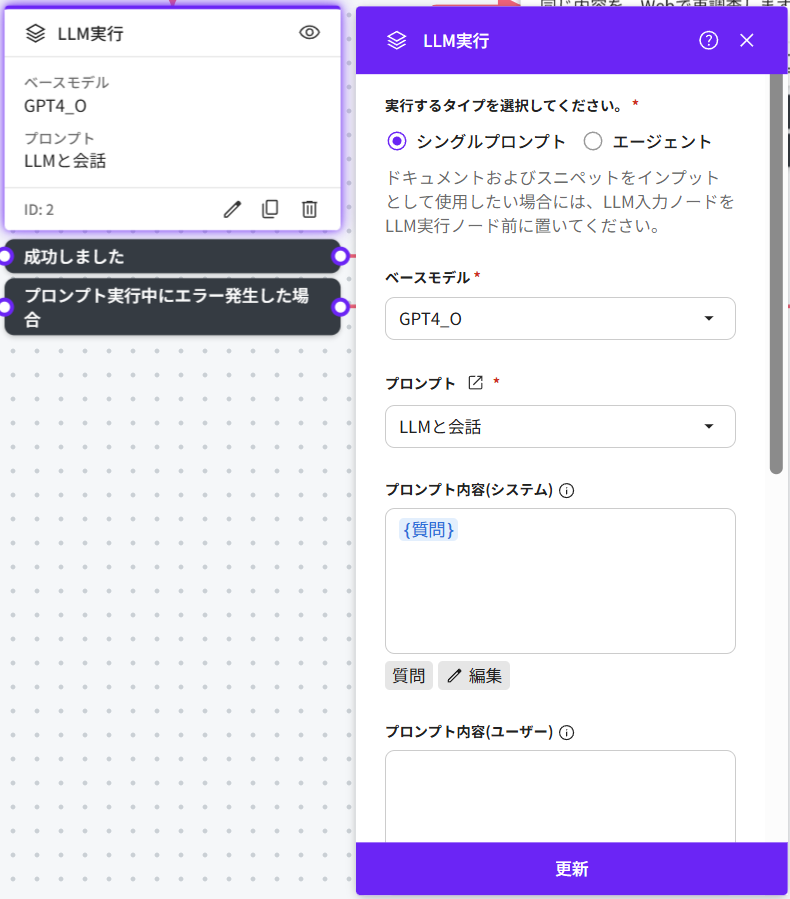
### LLMからの回答を生成(LLM実行ノード)
LLM実行ノードでは質問応答ノードでユーザーが入力した内容をプロンプトで指定し実行しています。
* ベースモデル:OPENAI GPT-4o
* プロンプト:LLMと会話
### Webからの回答を生成(回答生成ノード)
回答生成ノードでは質問応答ノードでユーザーが入力した内容を保存した変数情報(@QUERY)に対する回答を生成します。
回答生成ノードではグループプロンプトと呼ばれる種類のプロンプトのみセットすることができます。標準でセットされている回答生成のプロンプトは弊社の仕組み(RAG)とLLMの最適な組合せでのプロンプトを提供しています。
* ベースモデル:OPENAI GPT-4o
* グループプロンプト:回答生成
* 検索ソース:ウェブ
* 回答生成後:次のノードへ
* 回答生成に成功した場合、次のノードへ進みます。
* 回答が見つからなかった場合のアクションを指定:OFF
* LLMの方で回答生成自体には成功したものの、対象となる検索ソースから的確な回答が見つからず、「回答が見つかりませんでした」などのメッセージを表示した場合に、別途のアクションを指定できるオプションです。
---
# Agent Instructions
This documentation is published with GitBook. GitBook is the documentation platform designed so that both humans and AI agents can read, navigate, and reason over technical content effectively. Learn more at gitbook.com.
## Querying This Documentation
If you need additional information that is not directly available in this page, you can query the documentation by asking a question.
Perform an HTTP GET request on the following URL with the `ask` and `goal` query parameters:
```
GET https://docs.allganize.ai/alli-llm-app-market/manual/for_admin/default-apps/app-all/llmtowebkaraapuri.md?ask=&goal=
```
`ask` is the immediate question: it should be specific, self-contained, and written in natural language.
`goal` is what the user is ultimately trying to achieve, the reason they need the answer. Sharing it helps GitBook give you a better, more relevant answer. A goal is most helpful when it describes the outcome the user wants rather than restating the question. For example, with `ask=how do I create an API token`, a goal like `automate deployments from our CI pipeline` lets GitBook tailor the answer to that use case.
The response will contain a direct answer to the question and relevant excerpts and sources from the documentation.
Use this mechanism when the answer is not explicitly present in the current page, you need clarification or additional context, or you want to retrieve related documentation sections.