> For the complete documentation index, see [llms.txt](https://docs.allganize.ai/alli-llm-app-market/llms.txt). Markdown versions of documentation pages are available by appending `.md` to page URLs; this page is available as [Markdown](https://docs.allganize.ai/alli-llm-app-market/manual/for_admin/default-apps/ga-hr/job-posting-and-resume-matching.md).

# 求人票と履歴書マッチング

求人票と履歴書マッチングアプリでは、募集要項と求職者の履歴書を照らし合わせ、採用条件に合うかを判断します。

## フローの全体図 <a href="#overall" id="overall"></a>

<figure><img src="https://3244404108-files.gitbook.io/~/files/v0/b/gitbook-x-prod.appspot.com/o/spaces%2FR2CRA2CisD1pVQUgqd1g%2Fuploads%2FKXOhxexPZIlz2OV98s0z%2Fimage.png?alt=media&amp;token=33260658-de83-44cc-8f3c-d7c5a74aaca2" alt=""><figcaption></figcaption></figure>

## 概要 <a href="#outline" id="outline"></a>

求人票と履歴書マッチングアプリでは、ユーザー側で募集要項と求職者の履歴書をアップロードし、内容を照らし合わせ、最終的に指定した採用条件に合っているかどうかを判断することができます。

### ドキュメントのアップロード(LLMインプットノード) <a href="#llm-input-node1" id="llm-input-node1"></a>

LLMインプットノードでユーザーがアップロードしたドキュメントの内容を下記の変数に保存しています。

変数：＠DOC1

* 変数種別：会話変数
* タイプ：ドキュメント

<figure><img src="https://3244404108-files.gitbook.io/~/files/v0/b/gitbook-x-prod.appspot.com/o/spaces%2FR2CRA2CisD1pVQUgqd1g%2Fuploads%2Fpz7WHDlln8B2isngJXrw%2Fimage.png?alt=media&amp;token=19c22b43-c3c9-480e-884e-10943d52ab92" alt="" width="477"><figcaption></figcaption></figure>

### 求人票の内容から項目の抜粋(LLM実行ノード) <a href="#llm-node1" id="llm-node1"></a>

このLLM実行ノードでは、ユーザーがアップロードしたドキュメントの内容を保存した変数情報(@DOC1)をプロンプトで指定し実行しています。

* ベースモデル：OPENAI GPT-3.5 TURBO 16k
* プロンプト：求人票の抜粋

<figure><img src="https://3244404108-files.gitbook.io/~/files/v0/b/gitbook-x-prod.appspot.com/o/spaces%2FR2CRA2CisD1pVQUgqd1g%2Fuploads%2F0zxP2qVGTzmdB4To61O2%2Fimage.png?alt=media&amp;token=c0657deb-123a-4487-b996-5e0179581961" alt="" width="446"><figcaption></figcaption></figure>

<figure><img src="https://3244404108-files.gitbook.io/~/files/v0/b/gitbook-x-prod.appspot.com/o/spaces%2FR2CRA2CisD1pVQUgqd1g%2Fuploads%2FvEtjNaEfncJZnDZd9Nia%2Fimage.png?alt=media&amp;token=72a707ba-b9a0-4cb9-8c96-4438db6d2ba3" alt=""><figcaption></figcaption></figure>

また、実行の結果を下記の変数に保存しています。

変数：＠TERM1

* 変数種別：会話変数
* タイプ：文字列

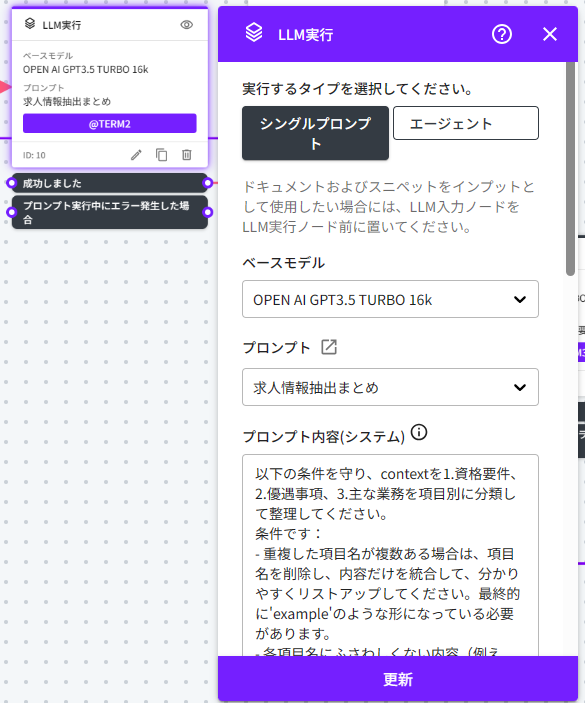
### 抽出された求人情報をまとめる(LLM実行ノード) <a href="#llm-node2" id="llm-node2"></a>

このLLM実行ノードでは、1つ前のLLM実行ノードで保存された変数情報(@TERM1)をプロンプトで指定し実行しています。

* ベースモデル：OPENAI GPT-4 TURBO
* プロンプト：求人情報抽出まとめ

<figure><img src="https://3244404108-files.gitbook.io/~/files/v0/b/gitbook-x-prod.appspot.com/o/spaces%2FR2CRA2CisD1pVQUgqd1g%2Fuploads%2FmH7l1dbtFSYn3dOxdjwi%2Fimage.png?alt=media&amp;token=39751e1e-6430-45cb-a12d-1e309a589156" alt="" width="439"><figcaption></figcaption></figure>

<figure><img src="https://3244404108-files.gitbook.io/~/files/v0/b/gitbook-x-prod.appspot.com/o/spaces%2FR2CRA2CisD1pVQUgqd1g%2Fuploads%2FRPKpMXQVcJ30XvJP94yC%2Fimage.png?alt=media&amp;token=644bec4e-dd1b-41cc-9542-d4f33172f066" alt=""><figcaption></figcaption></figure>

また、実行の結果を下記の変数に保存しています。

変数：＠TERM2

* 変数種別：会話変数
* タイプ：文字列

### 求職者の職務経歴書をアップロードする(LLMインプットノード) <a href="#llm-input-node2" id="llm-input-node2"></a>

ユーザーがアップロードしたドキュメントの内容を下記の変数に保存しています。

変数：＠DOC2

* 変数種別：会話変数
* タイプ：ドキュメント

<figure><img src="https://3244404108-files.gitbook.io/~/files/v0/b/gitbook-x-prod.appspot.com/o/spaces%2FR2CRA2CisD1pVQUgqd1g%2Fuploads%2FqKYspVkb56lpxudxvD5p%2Fimage.png?alt=media&amp;token=5be7d8c4-1015-4085-8544-0f3e79f75ca6" alt="" width="446"><figcaption></figcaption></figure>

### 抽出した職務経歴書を要約する(LLM実行ノード) <a href="#llm-node3" id="llm-node3"></a>

このLLM実行ノードでは、求人情報の抽出を行ったLLM実行ノードで保存した変数情報(@TERM2)と、ユーザーがアップロードしたドキュメントの内容を保存した変数情報(@DOC2)をプロンプトで指定し実行しています。

* ベースモデル：OPENAI GPT-4 TURBO
* プロンプト：抽出した職務経歴書を要約する

<figure><img src="https://3244404108-files.gitbook.io/~/files/v0/b/gitbook-x-prod.appspot.com/o/spaces%2FR2CRA2CisD1pVQUgqd1g%2Fuploads%2FAsS5f0bYHmcUBXYVocE4%2Fimage.png?alt=media&amp;token=fb592795-d2df-4998-84a6-153738d4a5d1" alt="" width="444"><figcaption></figcaption></figure>

<figure><img src="https://3244404108-files.gitbook.io/~/files/v0/b/gitbook-x-prod.appspot.com/o/spaces%2FR2CRA2CisD1pVQUgqd1g%2Fuploads%2FAcHFd4pwxdiX48ysfjje%2Fimage.png?alt=media&amp;token=28c96db9-1160-4983-b2d8-b720f87a93e4" alt=""><figcaption></figcaption></figure>

また、実行の結果を下記の変数に保存しています。

変数：＠TERM3

* 変数種別：会話変数
* タイプ：文字列

### 応募書類の適性を判定する(LLM実行ノード) <a href="#llm-node4" id="llm-node4"></a>

このLLM実行ノードでは、職務経歴書の情報を抽出したLLM実行ノードで保存した、変数情報(@TERM3)をプロンプトで指定し実行しています。

* ベースモデル：OPENAI GPT-4 TURBO
* プロンプト：応募書類の適正判定

<figure><img src="https://3244404108-files.gitbook.io/~/files/v0/b/gitbook-x-prod.appspot.com/o/spaces%2FR2CRA2CisD1pVQUgqd1g%2Fuploads%2FaIaFKpASV2ujugSTOZHS%2Fimage.png?alt=media&amp;token=d6ae3aa2-ed74-4575-bc91-6b223b064c6d" alt="" width="468"><figcaption></figcaption></figure>

<figure><img src="https://3244404108-files.gitbook.io/~/files/v0/b/gitbook-x-prod.appspot.com/o/spaces%2FR2CRA2CisD1pVQUgqd1g%2Fuploads%2FySa5mLyIThlley2SJM2l%2Fimage.png?alt=media&amp;token=27e2fd2e-687c-4c83-871c-29e91c7e30fd" alt=""><figcaption></figcaption></figure>

また、実行の結果を下記の変数に保存しています。

変数：＠TERM4

* 変数種別：会話変数
* タイプ：文字列

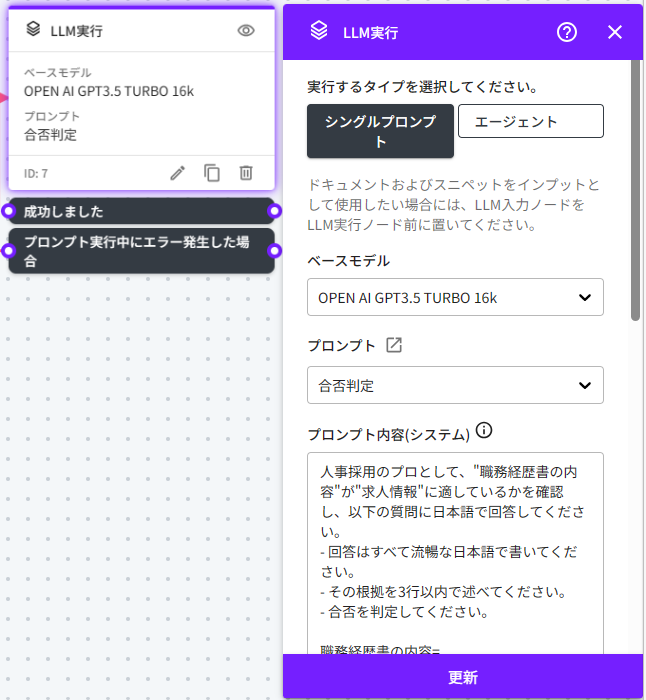
### 合否を判定する(LLM実行ノード) <a href="#llm-node5" id="llm-node5"></a>

このLLM実行ノードでは、抽出された求人情報をまとめたLLM実行ノードで保存した変数情報(@TERM2)と、応募書類の適性を判定するLLM実行ノードで保存した変数情報(@TERM4)をプロンプトで指定し実行しています。

* ベースモデル：OPENAI GPT-4 TURBO
* プロンプト：合否判定

<figure><img src="https://3244404108-files.gitbook.io/~/files/v0/b/gitbook-x-prod.appspot.com/o/spaces%2FR2CRA2CisD1pVQUgqd1g%2Fuploads%2FIiKC7kx1YSR0ZLK6DVmf%2Fimage.png?alt=media&amp;token=a701424d-4485-4bcf-9f2c-0ed2da520808" alt="" width="485"><figcaption></figcaption></figure>

<figure><img src="https://3244404108-files.gitbook.io/~/files/v0/b/gitbook-x-prod.appspot.com/o/spaces%2FR2CRA2CisD1pVQUgqd1g%2Fuploads%2FyrlDPMXpOMREnrQcMBYd%2Fimage.png?alt=media&amp;token=3e91954b-8d42-4f97-b7f5-dd5102b808c4" alt=""><figcaption></figcaption></figure>


---

# Agent Instructions
This documentation is published with GitBook. GitBook is the documentation platform designed so that both humans and AI agents can read, navigate, and reason over technical content effectively. Learn more at gitbook.com.

## Querying This Documentation
If you need additional information that is not directly available in this page, you can query the documentation by asking a question.

Perform an HTTP GET request on the following URL with the `ask` and `goal` query parameters:

```
GET https://docs.allganize.ai/alli-llm-app-market/manual/for_admin/default-apps/ga-hr/job-posting-and-resume-matching.md?ask=<question>&goal=<user_goal>
```

`ask` is the immediate question: it should be specific, self-contained, and written in natural language.
`goal` is what the user is ultimately trying to achieve, the reason they need the answer. Sharing it helps GitBook give you a better, more relevant answer. A goal is most helpful when it describes the outcome the user wants rather than restating the question. For example, with `ask=how do I create an API token`, a goal like `automate deployments from our CI pipeline` lets GitBook tailor the answer to that use case.

The response will contain a direct answer to the question and relevant excerpts and sources from the documentation.

Use this mechanism when the answer is not explicitly present in the current page, you need clarification or additional context, or you want to retrieve related documentation sections.