> For the complete documentation index, see [llms.txt](https://docs.allganize.ai/alli-llm-app-market/llms.txt). Markdown versions of documentation pages are available by appending `.md` to page URLs; this page is available as [Markdown](https://docs.allganize.ai/alli-llm-app-market/manual/for_admin/default-apps/legal-contracts/revenue-stamp-checker.md).
# 印紙チェッカー
印紙チェッカーアプリでは、ユーザーがアップロードした契約書から印紙金額をチェックすることができます。
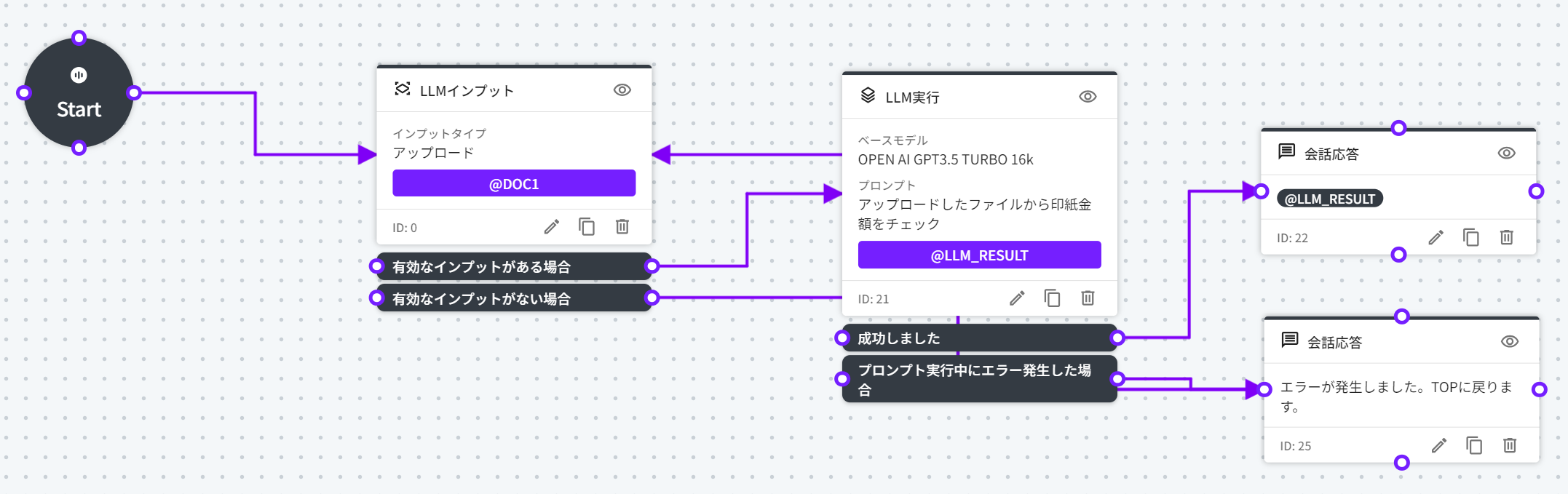
## フローの全体図
## 概要
印紙チェッカーアプリは、初めにユーザーが契約書のドキュメントをアップロードし、その内容についてLLMがプロンプトで指定されたチェック項目に基づいてチェックを行います。
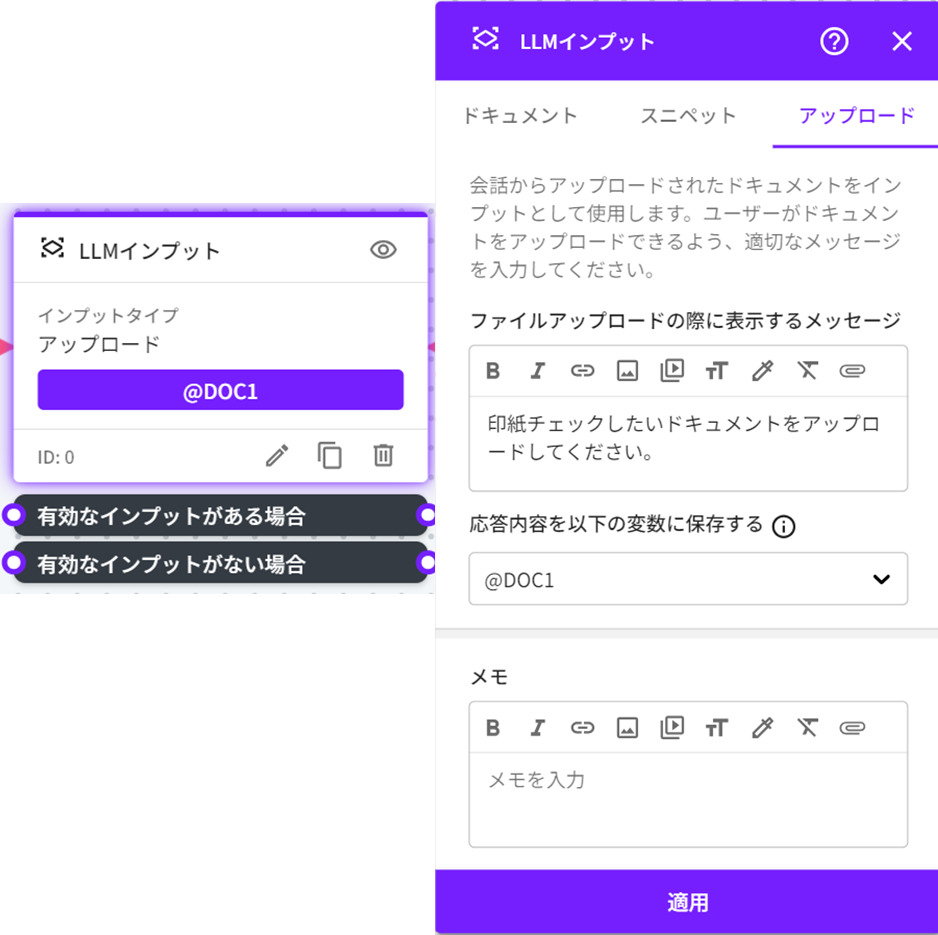
### 契約書のドキュメントのアップロード(LLMインプットノード)
LLMインプットノードでユーザーがアップロードした契約書のドキュメントの内容を下記の変数に保存しています。
変数:@DOC1
* 変数種別:会話変数
* タイプ:ドキュメント
### 印紙金額をチェック(LLM実行ノード)
LLM実行ノードではユーザーがアップロードした、契約書のドキュメントの内容を保存した変数情報(DOC1)をプロンプトで指定し実行しています。
* ベースモデル:OPENAI GPT-3.5 TURBO 16k
* プロンプト:アップロードしたファイルから印紙金額をチェック
また、実行の結果を下記の変数に保存しています。
変数:@LLM\_RESULT
* 変数種別:会話変数
* タイプ:文字列
### 結果の表示(会話応答ノード)
LLM実行ノードの実行結果が保存された変数情報(@LLM\_RESULT)を、会話応答ノードで表示しています。
---
# Agent Instructions
This documentation is published with GitBook. GitBook is the documentation platform designed so that both humans and AI agents can read, navigate, and reason over technical content effectively. Learn more at gitbook.com.
## Querying This Documentation
If you need additional information that is not directly available in this page, you can query the documentation by asking a question.
Perform an HTTP GET request on the following URL with the `ask` and `goal` query parameters:
```
GET https://docs.allganize.ai/alli-llm-app-market/manual/for_admin/default-apps/legal-contracts/revenue-stamp-checker.md?ask=&goal=
```
`ask` is the immediate question: it should be specific, self-contained, and written in natural language.
`goal` is what the user is ultimately trying to achieve, the reason they need the answer. Sharing it helps GitBook give you a better, more relevant answer. A goal is most helpful when it describes the outcome the user wants rather than restating the question. For example, with `ask=how do I create an API token`, a goal like `automate deployments from our CI pipeline` lets GitBook tailor the answer to that use case.
The response will contain a direct answer to the question and relevant excerpts and sources from the documentation.
Use this mechanism when the answer is not explicitly present in the current page, you need clarification or additional context, or you want to retrieve related documentation sections.