> For the complete documentation index, see [llms.txt](https://docs.allganize.ai/alli-llm-app-market/llms.txt). Markdown versions of documentation pages are available by appending `.md` to page URLs; this page is available as [Markdown](https://docs.allganize.ai/alli-llm-app-market/manual/knowledge-base/download-history.md).
# 履歴のダウンロード
メンバー/ユーザーがどのクエリーで検索を行ったか、および、クエリーに対してどの回答にフィードバックを与えたかを確認することができます。 ユーザーフィードバック、メンバーフィードバックの詳細については、以下のユーザーガイドを参照してください。
## クエリフィードバックのダウンロード
クエリトレーニングページにアクセスして、ダウンロードアイコンをクリックすることで、最大6ヶ月間のフィードバック付きのクエリをダウンロードできます。ダウンロードされたデータは、次の4つのシートにグループ化されています。
1. Q&A検索におけるメンバーフィードバック- [***こちらのユーザーガイド***](/alli-llm-app-market/manual/knowledge-base/agent-feedback-affect-on-search-results.md#using-the-search-preview-qa)
2. ドキュメント検索におけるメンバーフィードバック- [***こちらのユーザーガイド***](/alli-llm-app-market/manual/knowledge-base/agent-feedback-affect-on-search-results.md#using-the-search-preview-documents)
3. Q&A検索におけるユーザーフィードバック – [***こちらのユーザーガイド***](/alli-llm-app-market/manual/knowledge-base/customer-feedback-search-results.md#qa-search-results)
4. ドキュメント検索におけるのユーザーフィードバック – [***こちらのユーザーガイド***](/alli-llm-app-market/manual/knowledge-base/customer-feedback-search-results.md#document-search-results)
## Q&A検索履歴のダウンロード
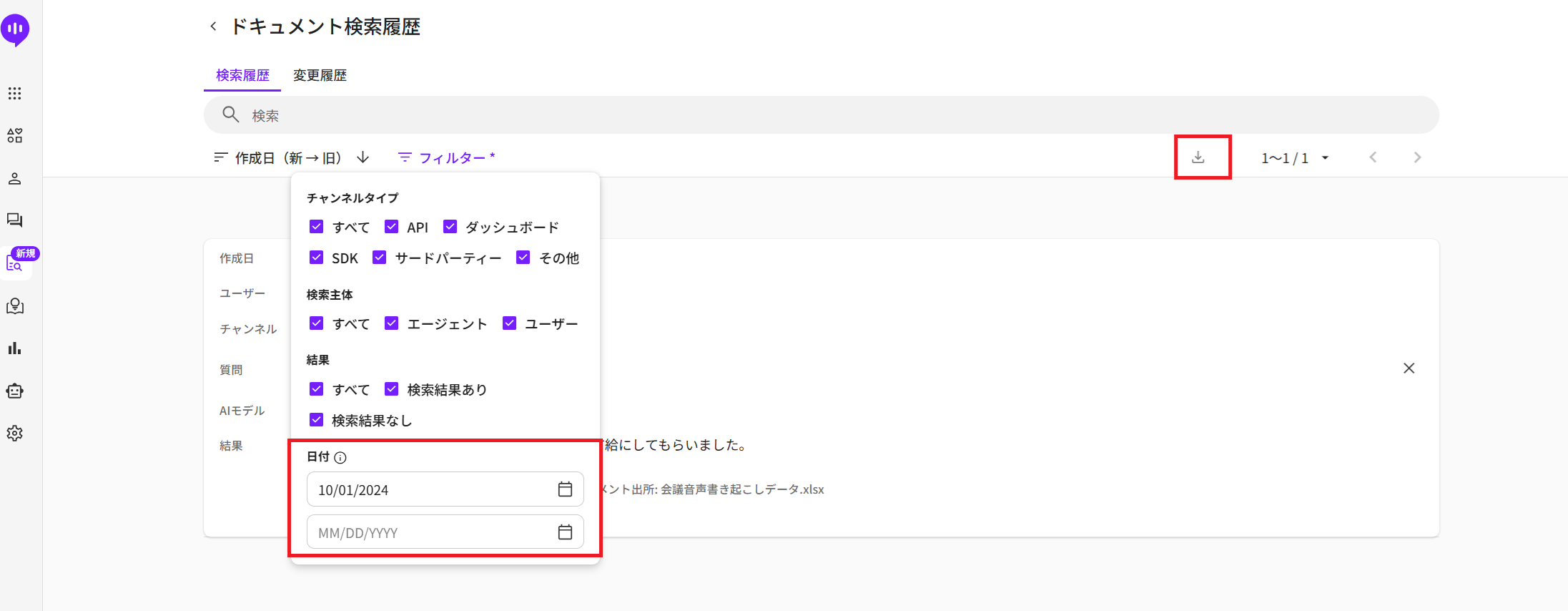
最大90日間のQ&A検索履歴をダウンロードできます。Q&A検索履歴ページにて、チャンネルタイプ、検索主体、結果の種類、および日付の範囲を指定してください。ダウンロードアイコンをアクティブにするには、フィルターにて日付範囲を最大90日間の範囲で設定する必要があります。
## ドキュメント検索履歴のダウンロード
最大90日間のドキュメント検索履歴をダウンロードできます。ドキュメント検索履歴ページにて、チャンネルタイプ、検索主体、結果の種類、および日付の範囲を指定してください。ダウンロードアイコンをアクティブにするには、フィルターにて日付範囲を最大90日間の範囲で設定する必要があります。
## ダウンロードの進行状況
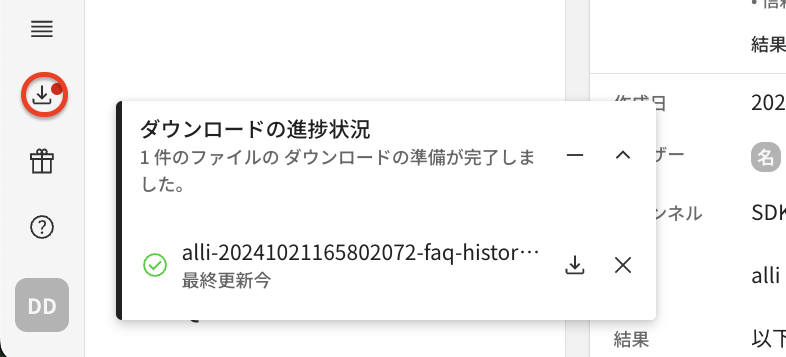
画面左下のポップアップウィンドウからダウンロードの進行状況のリストを確認することができます。 ログインしている場合は、ファイルが自動的にダウンロードされます。
ログアウト中にダウンロードできるファイルも同じく、検索・ダウンロードできます。 ダウンロードアイコンの横に表示される点(赤)は、ダウンロード可能なファイルがあることを意味します。
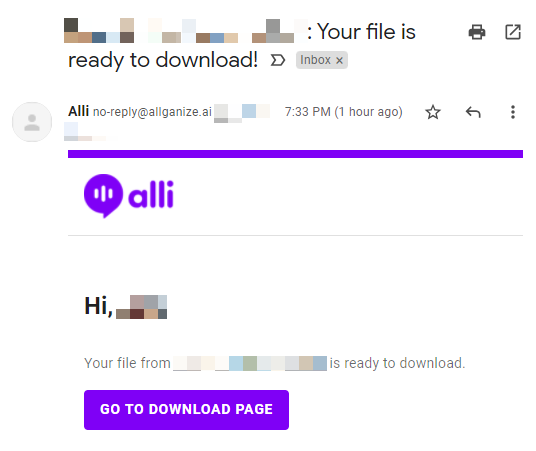
ログアウトしている間にファイルをダウンロードする準備ができた場合は、リマインダとしてメール通知が送信されます。
---
# Agent Instructions
This documentation is published with GitBook. GitBook is the documentation platform designed so that both humans and AI agents can read, navigate, and reason over technical content effectively. Learn more at gitbook.com.
## Querying This Documentation
If you need additional information that is not directly available in this page, you can query the documentation by asking a question.
Perform an HTTP GET request on the following URL with the `ask` and `goal` query parameters:
```
GET https://docs.allganize.ai/alli-llm-app-market/manual/knowledge-base/download-history.md?ask=&goal=
```
`ask` is the immediate question: it should be specific, self-contained, and written in natural language.
`goal` is what the user is ultimately trying to achieve, the reason they need the answer. Sharing it helps GitBook give you a better, more relevant answer. A goal is most helpful when it describes the outcome the user wants rather than restating the question. For example, with `ask=how do I create an API token`, a goal like `automate deployments from our CI pipeline` lets GitBook tailor the answer to that use case.
The response will contain a direct answer to the question and relevant excerpts and sources from the documentation.
Use this mechanism when the answer is not explicitly present in the current page, you need clarification or additional context, or you want to retrieve related documentation sections.