> For the complete documentation index, see [llms.txt](https://docs.allganize.ai/alli-llm-app-market/llms.txt). Markdown versions of documentation pages are available by appending `.md` to page URLs; this page is available as [Markdown](https://docs.allganize.ai/alli-llm-app-market/manual/knowledge-base/qa-candidates.md).
# Q\&A登録候補
## 未回答の質問リスト
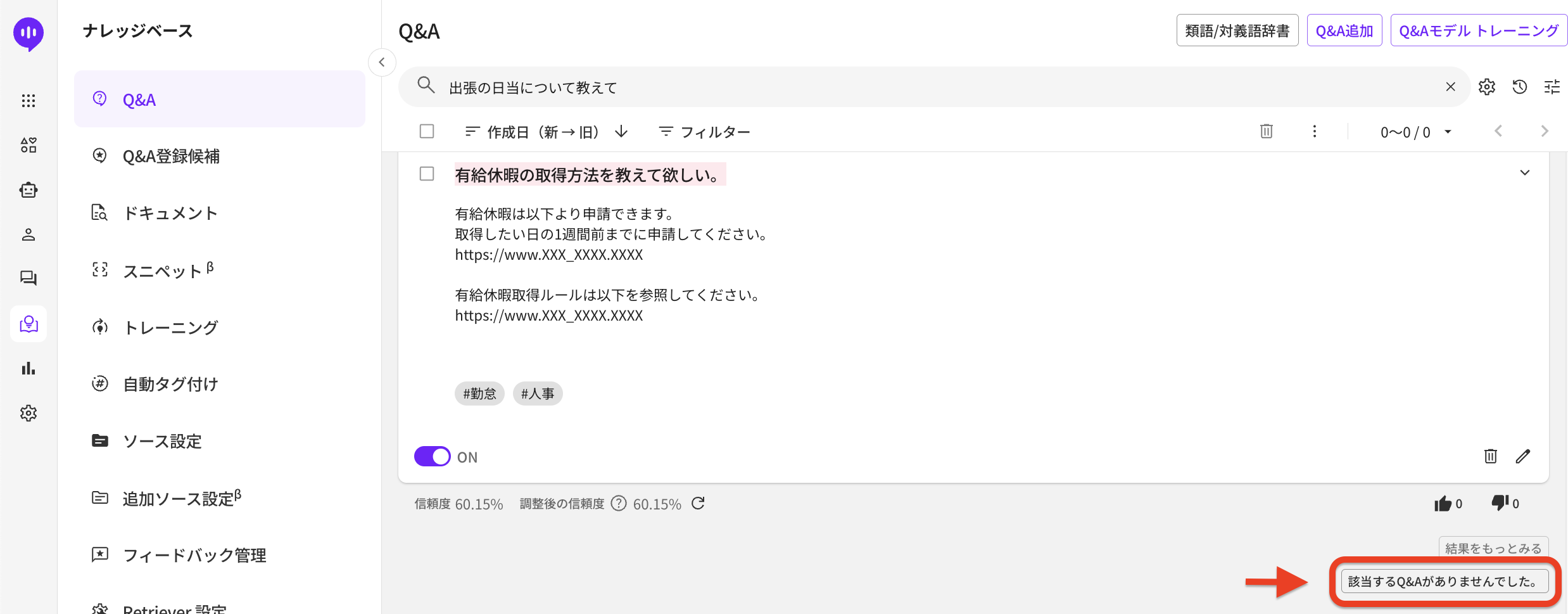
Q\&Aタブで検索欄に質問を入力後、Q\&A表示レビューで何も表示がない場合、その質問は自動的に未回答の質問リストに追加されます。
また、Alliは同時に、アップロードしたドキュメントから、質問に対する回答を検索します。
ドキュメントから抽出された内容が、希望する内容ではない場合は、Q\&A表示レビュー検索結果の下の「回答が見つかりませんでした」ボタンをクリックして、その質問を未回答の質問リストとして登録することができます。
AnswerBot SDKを使用している場合は、ユーザーの質問にも同じ処理が適用されます。回答が提示されない場合、あるいは、ユーザーが「該当する質問がありません」を選択した場合、質問は下記のように自動的に未回答のタブに登録されます。
\[ドキュメント]タブでも同様に、適切な回答が検出されていない場合は、次の「回答が見つかりませんで
した。」ボタンを押すと、その検索クエリを未回答未の質問リストに登録します。
***
## 類似質問候補リスト
同じ内容の質問でも、様々な表現方法があります。類似質問候補リストでは、ユーザーが行ったチャットを元に類似質問の候補のリストが表示され、メンバーは簡単に既存のQ&Aに類似質問を登録できます。
Alliでは、Q&Aに登録されている質問の表現だけでなく、ユーザーの質問の意味・意図を読み取り、登録済みのQ\&Aの中から近しいものを提示します。 ユーザーの質問が登録したQ&Aと完全に一致しない場合、類似質問候補リストに追加されます。類似質問候補リストでは追加された候補を確認し、Q&Aに類似質問として追加できます。
下記では類似質問候補リストに候補として登録されたユーザーの質問文を既存のQ\&Aに類似質問として追加する方法をお伝えします。
チャットで入力された新しい質問
質問は\[類似質問候補リスト]に表示されます。
ユーザーが既存のQ&Aとは異なる表現で質問を行い、提示されたQAをクリックした場合、「ナレッジベース> Q&A登録候補>類似質問候補リスト」に類似質問候補としてユーザーの質問が追加されます。
既存のQ\&Aに類似質問として追加する方法は下記のとおりです。
1\. 追加する質問を選択
2.「+」をクリック
3\. Q\&A編集画面で「登録する」をクリック
新たに登録された類似質問は、Q&Aタブにて確認ができます。
---
# Agent Instructions
This documentation is published with GitBook. GitBook is the documentation platform designed so that both humans and AI agents can read, navigate, and reason over technical content effectively. Learn more at gitbook.com.
## Querying This Documentation
If you need additional information that is not directly available in this page, you can query the documentation by asking a question.
Perform an HTTP GET request on the following URL with the `ask` and `goal` query parameters:
```
GET https://docs.allganize.ai/alli-llm-app-market/manual/knowledge-base/qa-candidates.md?ask=&goal=
```
`ask` is the immediate question: it should be specific, self-contained, and written in natural language.
`goal` is what the user is ultimately trying to achieve, the reason they need the answer. Sharing it helps GitBook give you a better, more relevant answer. A goal is most helpful when it describes the outcome the user wants rather than restating the question. For example, with `ask=how do I create an API token`, a goal like `automate deployments from our CI pipeline` lets GitBook tailor the answer to that use case.
The response will contain a direct answer to the question and relevant excerpts and sources from the documentation.
Use this mechanism when the answer is not explicitly present in the current page, you need clarification or additional context, or you want to retrieve related documentation sections.