> For the complete documentation index, see [llms.txt](https://docs.allganize.ai/nlu-api-dashboard/llms.txt). Markdown versions of documentation pages are available by appending `.md` to page URLs; this page is available as [Markdown](https://docs.allganize.ai/nlu-api-dashboard/model-management/performance-metrics.md).
# Performance Metrics
Understand how to measure the performance of each API model and metrics, and how to calculate each metric.
The NLU service uses various metrics to show the performance and characteristics of the model. The correct interpretation of these metrics is vital to utilize the full power of NLU.
The overall metrics we use in NLU are
1. Precision
2. Recall
3. F1-score
4. Accuracy.
{% hint style="info" %}
For the definition of each metric, please refer to [Term](/nlu-api-dashboard/terms.md)s page
{% endhint %}
## How to Measure Performance
You can train a model by clicking the 'Train Model' button on the top right corner of the Dashboard. The training process ends with measuring the model's performance using the samples you marked as 'Test' in the Dashboard tab page \[Image 1].
[Image 1] Start model training with samples to measure performance
## Where you can check Performance
The 'History' tap page lists up models you trained with the measured performances in order of most recent creation. \[Image 2]
[Image 2] Model history with each model measured its performance metrics
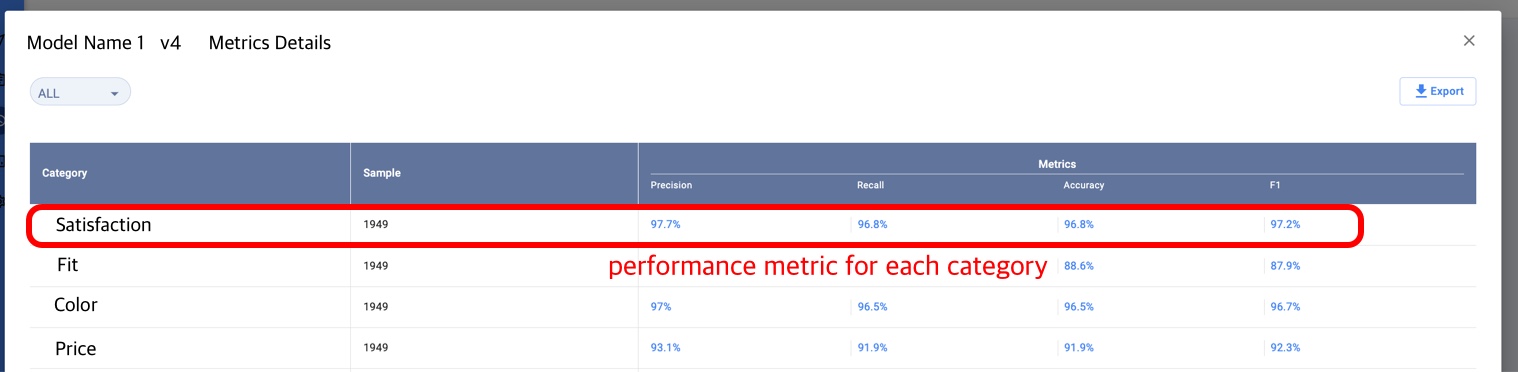
If you press the 'details' button provided for each model, you can check the performance metric for each category \[Image 3]