# Navigation

This page walks you through various menus that you'll find within NLU API Dashboard.

## GNB Tab

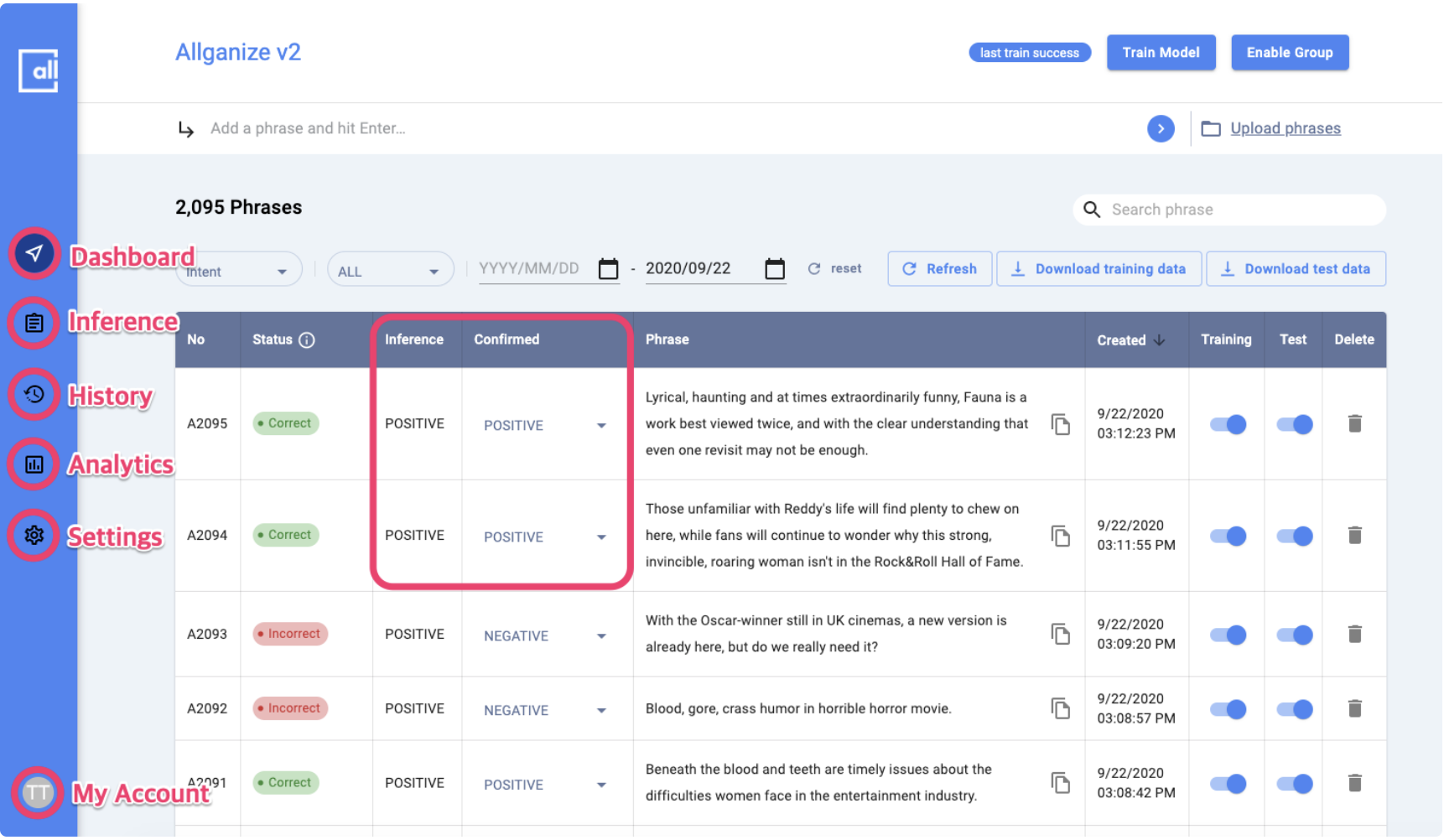
You can use the API Dashboard menues through the GNB on the left.

* Dashboard
* Inference
* History
* Analytics&#x20;
* Settings
* My Account

## Dashboard  &#x20;

In the Dashboard menu page, you'll find the inference result by model and you can confirm the result or correct manually when the inference result is incorrect.&#x20;

{% hint style="info" %}
**The process of checking and correcting the results of the model in Dashboard menu** can further improve the performance of the model.&#x20;
{% endhint %}

<figure><img src="https://130024530-files.gitbook.io/~/files/v0/b/gitbook-x-prod.appspot.com/o/spaces%2FbLiHRL2K36Nfs8G0PSiU%2Fuploads%2FiM5IAF4Zx9x3BjCR15Ge%2FScreenshot%202023-03-17%20at%2011.13.19%20AM.png?alt=media&#x26;token=9e065754-8689-451e-a464-ae135b0f3f7b" alt=""><figcaption><p>GNB > Dashboard [Text Classification project screenshot for eaxmple]</p></figcaption></figure>

{% hint style="info" %}
Please note that the **UI for checking and correcting inference results** in dashboard is slightly different  between individual APIs because the analysis context and result is different.
{% endhint %}

<figure><img src="https://130024530-files.gitbook.io/~/files/v0/b/gitbook-x-prod.appspot.com/o/spaces%2FbLiHRL2K36Nfs8G0PSiU%2Fuploads%2FIzm17Bq6BI0D3HJ1r844%2FScreenshot%202023-03-17%20at%2011.26.35%20AM.png?alt=media&#x26;token=bdaed7fd-ea13-4e43-be0b-cf6625cfa5bb" alt=""><figcaption><p>GNB > Dashboard [NER project  screenshot for eaxmple]</p></figcaption></figure>

<figure><img src="https://130024530-files.gitbook.io/~/files/v0/b/gitbook-x-prod.appspot.com/o/spaces%2FbLiHRL2K36Nfs8G0PSiU%2Fuploads%2F2VguxhmOgj0klBC7xq0e%2FScreenshot%202023-03-17%20at%2011.46.26%20AM.png?alt=media&#x26;token=4bd92754-cda3-484c-b6d6-c92b1c91d760" alt=""><figcaption><p>GNB > Dashboard [Review Analysis project  screenshot for eaxmple]</p></figcaption></figure>

## Inference&#x20;

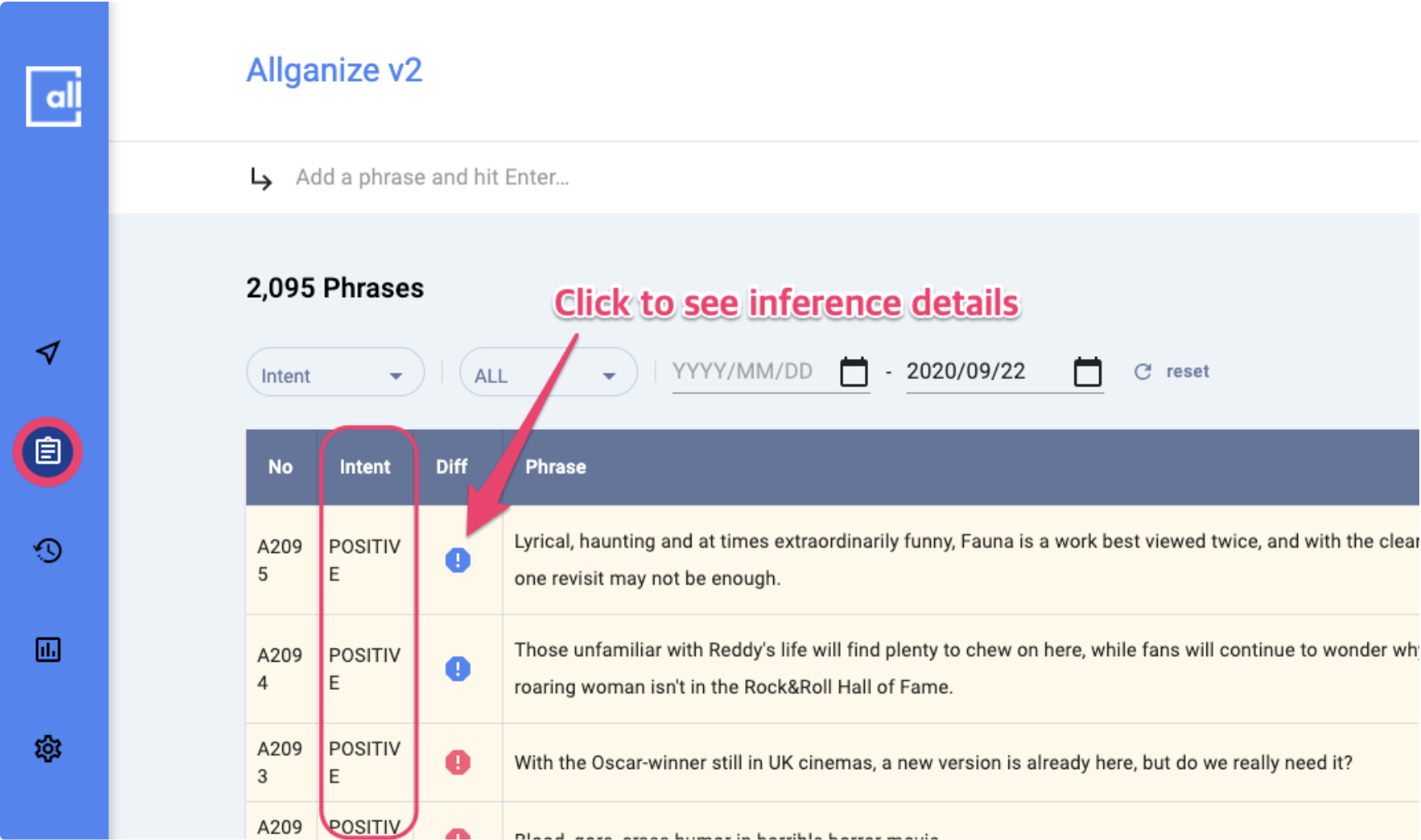
In the Inference menu, you can check **the details of the inference result given by the model** and the difference between inference and confirmed result.&#x20;

<figure><img src="https://130024530-files.gitbook.io/~/files/v0/b/gitbook-x-prod.appspot.com/o/spaces%2FbLiHRL2K36Nfs8G0PSiU%2Fuploads%2F50rY24EMN9WLzzx1q9fQ%2FScreenshot%202023-03-17%20at%2011.22.19%20AM.png?alt=media&#x26;token=2de3eaf5-3a2f-400c-aa70-27433243cd5e" alt=""><figcaption><p>GNB > Inference [Sentiment Analysis project  screenshot for eaxmple]</p></figcaption></figure>

{% hint style="info" %}
Please note that the **UI for checking detailed inference results** in Inference page is slightly different  between individual APIs because the analysis context and result is different.
{% endhint %}

<figure><img src="https://130024530-files.gitbook.io/~/files/v0/b/gitbook-x-prod.appspot.com/o/spaces%2FbLiHRL2K36Nfs8G0PSiU%2Fuploads%2FCqVXYYQEm8lHJcAWT3BB%2FScreenshot%202023-03-17%20at%2011.40.31%20AM.png?alt=media&#x26;token=66e29a1f-5a2a-41a6-b01d-d83eebd7eea9" alt=""><figcaption><p>GNB > Inference [NER project  screenshot for eaxmple]</p></figcaption></figure>

## History

In History menu, you can

* Apply a new model trained.&#x20;
  * Once a model training is done, you can click 'Deploy' button here to apply the new model.

<figure><img src="https://130024530-files.gitbook.io/~/files/v0/b/gitbook-x-prod.appspot.com/o/spaces%2FbLiHRL2K36Nfs8G0PSiU%2Fuploads%2FeVmjHlzmbbxJ0uLDEieK%2FScreenshot%202023-03-17%20at%2011.56.19%20AM.png?alt=media&#x26;token=4d92cc30-c254-4fb1-b761-e10cbbec4260" alt=""><figcaption><p>GNB > Model History</p></figcaption></figure>

Besides that, you can:&#x20;

* Check model creation and distribution history for each version.
* Apply the previously trained models if needed.
* Check the performance metric for each model version.&#x20;
  * Please refer to [**Performance Metric**](https://docs.allganize.ai/nlu-api-dashboard/model-management/performance-metrics) for details.

## Analytics

In Statistics menu, you can check out several statistics indexes for API project usage data and export them into .xlsx file format.

<figure><img src="https://130024530-files.gitbook.io/~/files/v0/b/gitbook-x-prod.appspot.com/o/spaces%2FbLiHRL2K36Nfs8G0PSiU%2Fuploads%2F0nLZHf00DFNEhUWbhga6%2FAnalytics.jpg?alt=media&#x26;token=6cfa2199-2fb5-4f79-bf11-80c4e5f953b8" alt=""><figcaption><p>GNB > Analytics</p></figcaption></figure>

## Settings

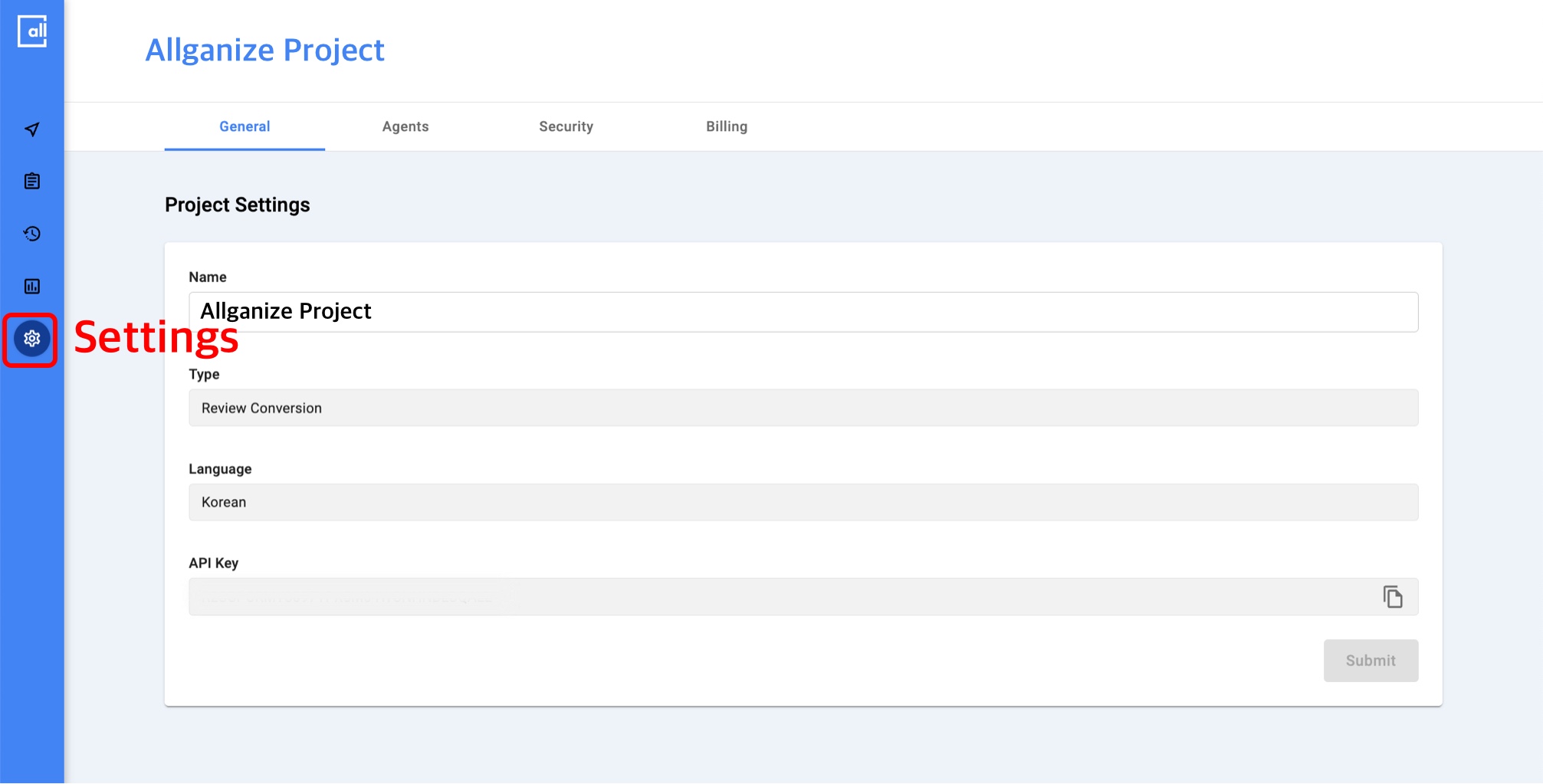
In Settings menu, you can check the project details including API Key and manage billing information. If your project is an NER project, you can manage registered named entities as well.

<figure><img src="https://130024530-files.gitbook.io/~/files/v0/b/gitbook-x-prod.appspot.com/o/spaces%2FbLiHRL2K36Nfs8G0PSiU%2Fuploads%2FLvjyLelt51CGnh6ajApK%2FSettings.jpg?alt=media&#x26;token=9fe0496a-cf65-4baf-b132-c712d17c4eb4" alt=""><figcaption><p>GNB > Settings</p></figcaption></figure>

## My Account

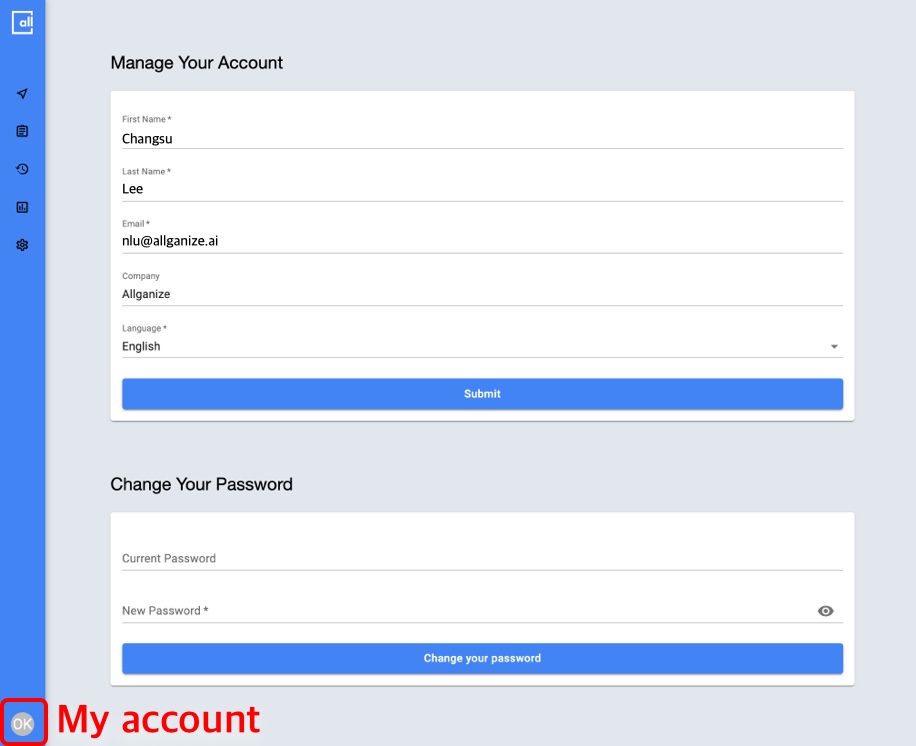
In My Account Menu, you can check and modify your account information including name, language and password.

<figure><img src="https://130024530-files.gitbook.io/~/files/v0/b/gitbook-x-prod.appspot.com/o/spaces%2FbLiHRL2K36Nfs8G0PSiU%2Fuploads%2FQdTv2EdYtUvpb4qpoExn%2FAccount.jpg?alt=media&#x26;token=fec52a33-e270-4b56-97c4-2e2d2e69430c" alt=""><figcaption></figcaption></figure>