> For the complete documentation index, see [llms.txt](https://docs.allganize.ai/allganize-alli-works-userguide-en/llms.txt). Markdown versions of documentation pages are available by appending `.md` to page URLs; this page is available as [Markdown](https://docs.allganize.ai/allganize-alli-works-userguide-en/usage-records-and-member-information/llm-statistics.md).
# LLM statistics
You can view statistics based on LLMs and LLM apps. By clicking the Statistics icon in the Dashboard, you can check the number of user requests and LLM calls by usage, including apps. Let's take a closer look.
**\[Usage]**
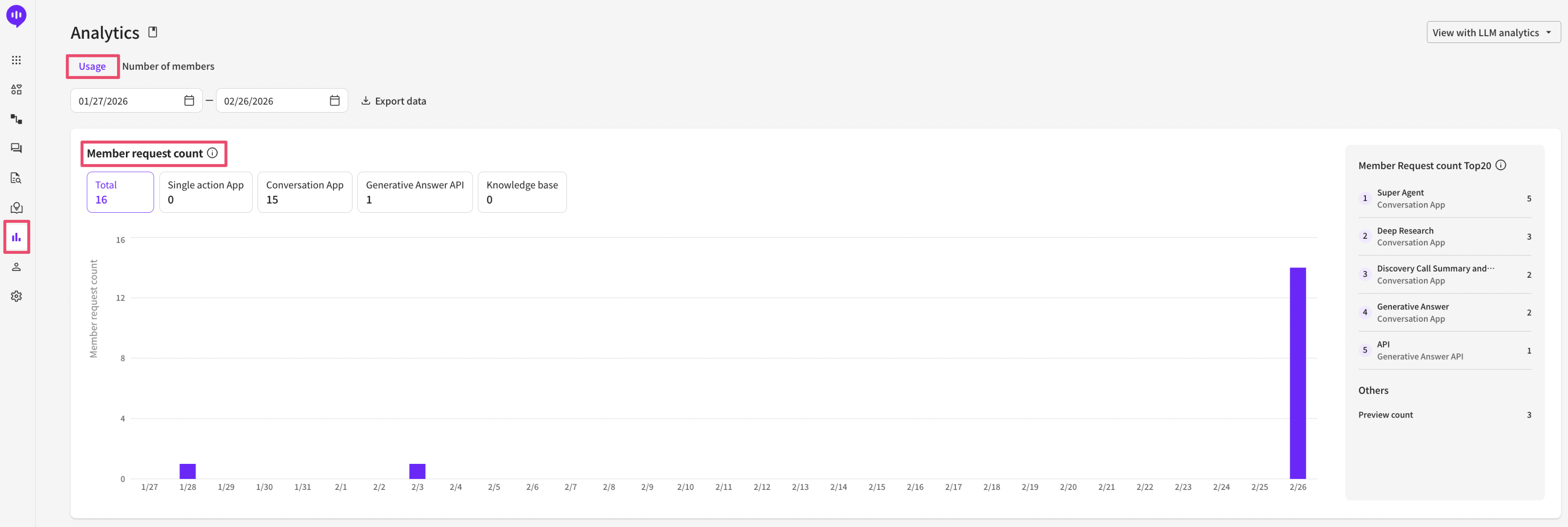
* In the Usage tab, you can set the statistical period you want to check.
* You can download the full statistics for each metric/chart as an Excel file. You can specify and download a range of up to 6 months. The downloaded file also aggregates and displays the number of documents created (by day) and the number of documents deleted (by day).
* Member request count: The number of times members in that project requested execution of LLM-related features and the number of times they provided input within apps (proceeding to the next step via button clicks, message input, etc.). - Total: The combined count of all requests from answer-type apps, conversational apps, APIs, and knowledge base. - Answer-type apps: The number of times executed via the generate button (or equivalent API call). \*If a single request triggers multiple LLM calls (for example, using document upload input), it is still counted as 1 based on the number of times the ‘generate button’ was pressed. - Conversational apps: The number of times a member provided input (message entry, button click, form submission, etc.) (or called an equivalent API). - Answer-generation API: The number of times 'answer generation' was requested via the API. This aggregation counts only answer generation, so if the API activated other apps, those are categorized and aggregated under answer-type / conversational apps. - Knowledge base: The number of times the 'Generate' button was clicked on the knowledge base screen in the Dashboard.
* Top 20 by member requests: The top 20 apps with the most member requests are ranked and displayed. This includes only actual app runs; tests using the 'Preview' button are not included. (Preview tests are aggregated and counted as 'Preview counts' under Other.)
* Other: The total of tests done with the 'Preview' button (preview counts) plus requests coming from other resources (Other). Apps are not distinguished in this total.
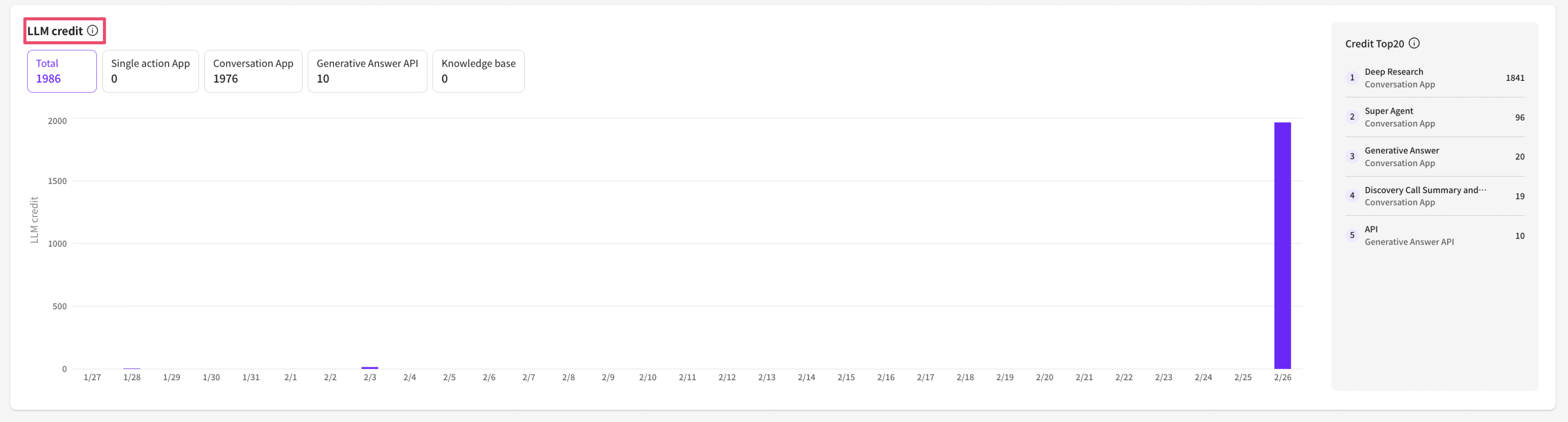
* LLM credits: The number of credits deducted (consumed) within that project. - Total: The credit consumption that combines all LLM executions and model usage from answer-type apps, conversational apps, APIs, and knowledge base. - Answer-type apps: Credits consumed due to answer generation or action execution. - Conversational apps: Credits consumed due to answer generation or action execution triggered by member input. - Answer-generation API: Credits consumed when generating answers via the API. This aggregation counts only answer generation, so if the API triggered other apps, those apps are categorized and aggregated under answer-type / conversational apps. - Knowledge base: Credits consumed when performing Q\&A generation and summarization tasks on the knowledge base screen in the Dashboard. Credit calculation methods vary by model and token count, so [see the pricing page](https://www.allganize.ai/ko/pricing)for details.
* Top 20 by credits: The top 20 apps with the highest credit consumption are ranked and displayed. This includes only credits consumed by publicly available apps; tests using the 'Preview' button are not included. (Preview tests are aggregated and counted as 'Preview counts' under Other.)
* Other: The total of tests done with the 'Preview' button (preview counts) plus requests coming from other resources (Other). Apps are not distinguished in this total.
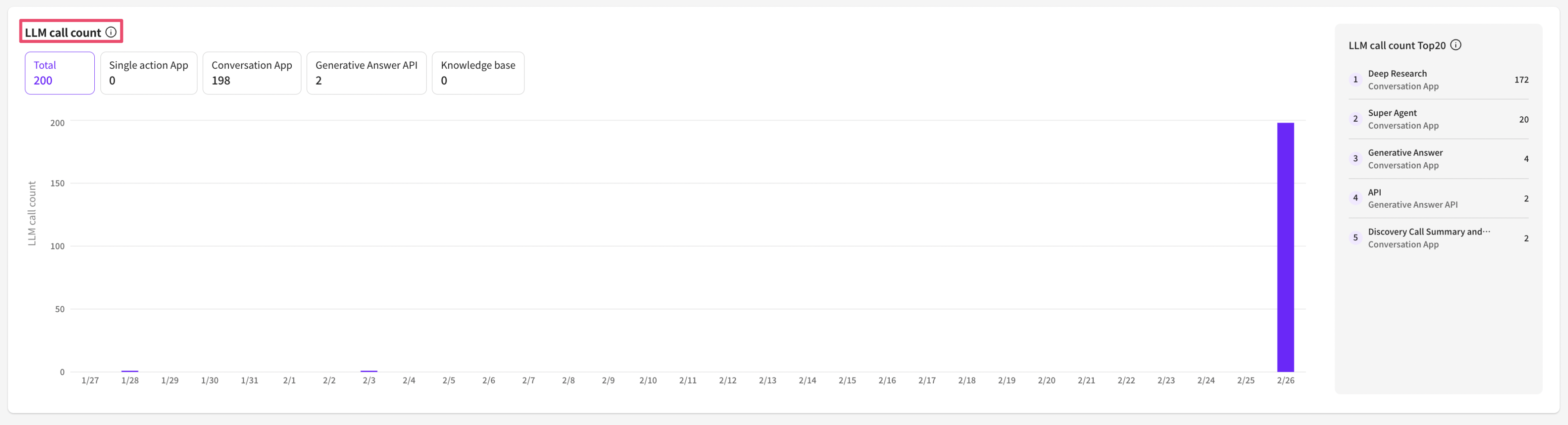
* LLM call count: The actual number of times the LLM was called in that project. \*Numbers used when testing to install apps on the App Market page are not included. - Total: The combined number of LLM executions from answer-type apps, conversational apps, APIs, and knowledge base. - Answer-type apps: The number of times the LLM was executed until an answer was generated or an action was executed. - Conversational apps: The number of times the LLM was executed until an answer was generated or an action was executed as a result of member input. - Answer-generation API: The number of times the LLM was executed when generating an answer via the API. This aggregation counts only answer generation, so if the API triggered other apps, those apps are categorized and aggregated under answer-type / conversational apps. - Knowledge base: The number of times the LLM was executed when performing Q\&A generation and summarization tasks on the knowledge base screen in the Dashboard.
* Top 20 by member requests: The top 20 apps with the most user requests are ranked and displayed. This includes only actual runs; tests using the 'Preview' button are not included. (Preview tests are aggregated and counted as 'Preview counts' under Other.)
* Other: The total of tests done with the 'Preview' button (preview counts) plus requests coming from other resources (Other). Apps are not distinguished in this total.
**\[Number of members]**
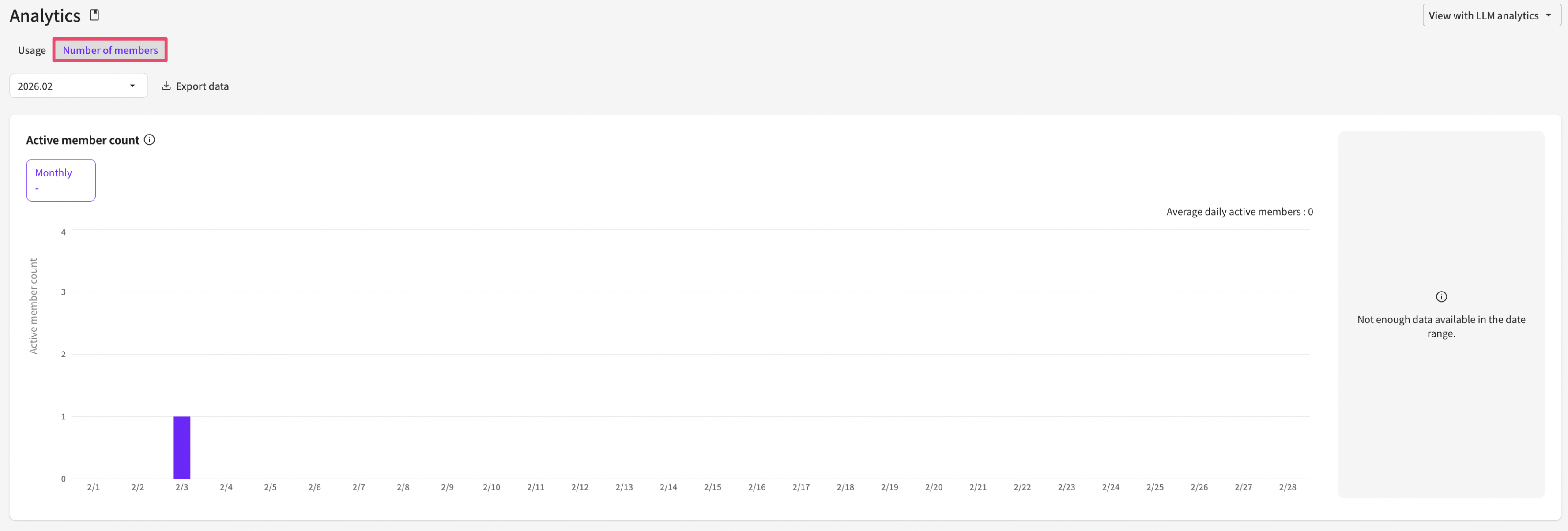
1. In the Members tab, you can basically check the monthly and daily active member counts.
2. You can also check monthly, daily, and average active member counts. If you want more detailed monthly or daily app usage records, you can download each detailed dataset via the Data Export function (section 4). The downloaded file also aggregates and displays the number of documents created (by day) and the number of documents deleted (by day). \*Monthly active user counts begin aggregation at 00:30 (UTC+0) on the 1st of each month, and daily active user counts begin aggregation at 00:30 (UTC+0) each day. These processes take several hours.
3. You can view the top 20 apps by active member count. The method for calculating the top 20 apps is as follows. (Only unique members with duplicates removed are counted in the aggregation) 1) Answer-type apps: Number of members who executed the generate button 2) Conversational apps: Number of members who provided input such as messages or button clicks 3) Answer-generation API: Number of members who requested answer generation via the API